Download the kubeconfig of a cluster Kubernetes
Download the kubeconfig file of a cluster Kubernetes. This file allows a Kubernetes client to connect to the cluster.
Example of use with kubectl:
kubectl --kubeconfig=kubeconfig.yaml get nodes
Permissions
This action requires the following IAM (Identity and Access Management) permissions:
- kubernetes.cluster.get
- Console
- API
-
From the left-hand side menu, click Managed services → Kubernetes to access the list of clusters Kubernetes.

-
Click the ID of the cluster whose kubeconfig you want to download to access its details page.

-
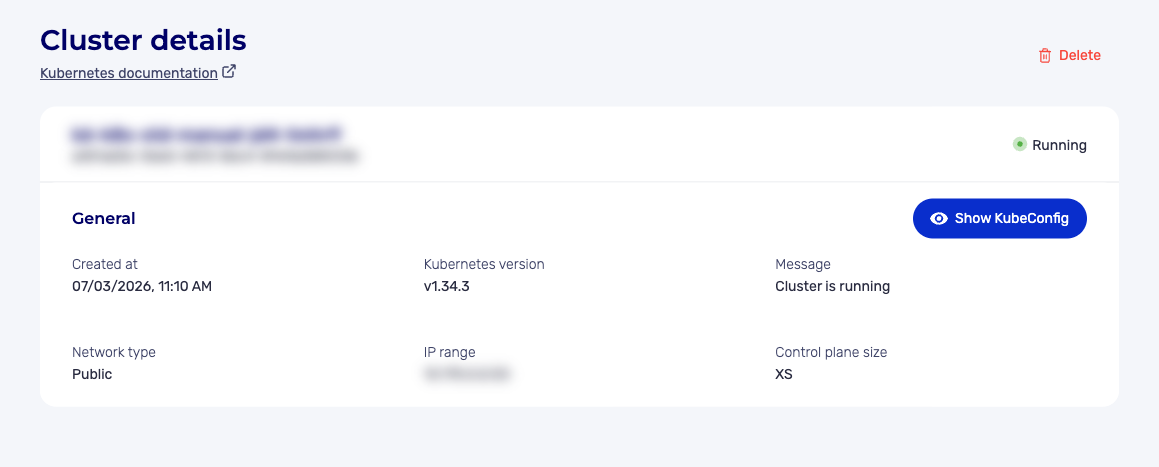
In the General section, click the View KubeConfig button.
-
In the window that appears, choose the action you want:
- Copy KubeConfig: copies the content of the kubeconfig to the clipboard;
- KubeConfig (download icon): downloads the kubeconfig file in YAML format.
noteThe View KubeConfig button is only available if the cluster is in the "Running" state.
Use the GET /kubernetes/spaces/{spaceId}/clusters/{clusterId}/kubeConfig route to retrieve the kubeconfig file of a cluster Kubernetes.
Example response
{
  "kubeConfig": "apiVersion: v1\nclusters:\n- cluster:\n    certificate-authority-data: LS0tLS1CRUdJTiBDRVJUSUZJQ0FURS0tLS0t...\n    server: https://550e8400-e29b-41d4-a716-446655440000.eu-west-2.numspot.com:6443\n  name: my-cluster\ncontexts:\n- context:\n    cluster: my-cluster\n    user: admin\n  name: admin@my-cluster\ncurrent-context: admin@my-cluster\nkind: Config\npreferences: {}\nusers:\n- name: admin\n  user:\n    client-certificate-data: LS0tLS1CRUdJTiBDRVJUSUZJQ0FURS0tLS0t...\n    client-key-data: LS0tLS1CRUdJTiBFQyBQUklWQVRFIEtFWS0tLS0t..."
}
Create a specific kubeconfig for a user
The kubeconfig retrieved through the API has administrator rights. To create a kubeconfig with limited permissions, use a ServiceAccount.
Principle
- Create a ServiceAccount;
- Assign permissions through RBAC (Role-Based Access Control);
- Extract the token of the ServiceAccount;
- Generate a custom kubeconfig.
Create a ServiceAccount
apiVersion: v1
kind: ServiceAccount
metadata:
  name: dev-user
  namespace: production
kubectl apply -f serviceaccount.yaml
Assign permissions
apiVersion: rbac.authorization.k8s.io/v1
kind: Role
metadata:
  name: developer
  namespace: production
rules:
- apiGroups: [""]
  resources: ["pods", "services", "configmaps"]
  verbs: ["get", "list", "watch", "create", "update", "patch", "delete"]
- apiGroups: ["apps"]
  resources: ["deployments", "replicasets"]
  verbs: ["get", "list", "watch", "create", "update", "patch", "delete"]
---
apiVersion: rbac.authorization.k8s.io/v1
kind: RoleBinding
metadata:
  name: dev-user-binding
  namespace: production
subjects:
- kind: ServiceAccount
  name: dev-user
  namespace: production
roleRef:
  kind: Role
  name: developer
  apiGroup: rbac.authorization.k8s.io
kubectl apply -f role.yaml
Extract the token of the ServiceAccount
#Kubernetes < 1.24: token created automatically
kubectl get secret -n production $(kubectl get serviceaccount dev-user -n production -o jsonpath='{.secrets[0].name}') -o jsonpath='{.data.token}' | base64 -d

#Kubernetes >= 1.24: create a token manually
kubectl create token dev-user -n production --duration=8760h
Generate the custom kubeconfig
#!/bin/bash

CLUSTER_NAME="my-cluster"
CLUSTER_ENDPOINT="https://<cluster-endpoint>:6443"
NAMESPACE="production"
SA_NAME="dev-user"

#Retrieve the cluster CA
CA_CERT=$(kubectl config view --raw -o jsonpath='{.clusters[0].cluster.certificate-authority-data}')

#Create the token (Kubernetes >= 1.24)
TOKEN=$(kubectl create token $SA_NAME -n $NAMESPACE --duration=8760h)

#Generate the kubeconfig
cat > kubeconfig-dev-user.yaml <<EOF
apiVersion: v1
kind: Config
clusters:
- cluster:
    certificate-authority-data: $CA_CERT
    server: $CLUSTER_ENDPOINT
  name: $CLUSTER_NAME
contexts:
- context:
    cluster: $CLUSTER_NAME
    namespace: $NAMESPACE
    user: $SA_NAME
  name: ${SA_NAME}@${CLUSTER_NAME}
current-context: ${SA_NAME}@${CLUSTER_NAME}
users:
- name: $SA_NAME
  user:
    token: $TOKEN
EOF

echo "Kubeconfig generated: kubeconfig-dev-user.yaml"
Verify the kubeconfig
#Test the connection
kubectl --kubeconfig=kubeconfig-dev-user.yaml get pods -n production

#Check the permissions
kubectl --kubeconfig=kubeconfig-dev-user.yaml auth can-i --list
Rotation of kubeconfig
Rotating kubeconfig credentials is essential for security. Perform a regular rotation (every 90 days for sensitive environments).
Rotation of the main kubeconfig
To regenerate the main (admin) kubeconfig, contact Numspot support, which will carry out the rotation of the credentials.
While waiting for the rotation, you can immediately block suspicious access through RBAC (see Block a user).
Rotation of ServiceAccount tokens
For ServiceAccounts, create a new token:
#Delete the old token (if secret exists)
kubectl delete secret -n <namespace> <secret-name>

#Create a new token
kubectl create token <serviceaccount> -n <namespace> --duration=8760h
Automate the rotation
Create an automated rotation script:
#!/bin/bash

CLUSTER_NAME="my-cluster"
NAMESPACE="production"
SA_NAME="dev-user"
KUBECONFIG_PATH="/path/to/kubeconfigs"

#Create a new token
NEW_TOKEN=$(kubectl create token $SA_NAME -n $NAMESPACE --duration=8760h)

#Retrieve the CA
CA_CERT=$(kubectl config view --raw -o jsonpath='{.clusters[0].cluster.certificate-authority-data}')

#Retrieve the endpoint
CLUSTER_ENDPOINT=$(kubectl config view --raw -o jsonpath='{.clusters[0].cluster.server}')

#Generate the new kubeconfig
cat > ${KUBECONFIG_PATH}/kubeconfig-${SA_NAME}-$(date +%Y%m%d).yaml <<EOF
apiVersion: v1
kind: Config
clusters:
- cluster:
    certificate-authority-data: $CA_CERT
    server: $CLUSTER_ENDPOINT
  name: $CLUSTER_NAME
contexts:
- context:
    cluster: $CLUSTER_NAME
    namespace: $NAMESPACE
    user: $SA_NAME
  name: ${SA_NAME}@${CLUSTER_NAME}
current-context: ${SA_NAME}@${CLUSTER_NAME}
users:
- name: $SA_NAME
  user:
    token: $NEW_TOKEN
EOF

echo "New kubeconfig generated: ${KUBECONFIG_PATH}/kubeconfig-${SA_NAME}-$(date +%Y%m%d).yaml"
Rotation scheduling
| kubeconfig type | Recommended frequency | Method |
|---|---|---|
| Main admin | Every 90 days | Numspot API |
| Production ServiceAccount | Every 90 days | kubectl create token |
| Dev ServiceAccount | Every 180 days | kubectl create token |
| CI/CD | Every 365 days | Automated |
Kubernetes user groups
Kubernetes supports groups to manage the permissions of several users simultaneously.
Principle of groups
Groups allow you to:
- apply common permissions to several users;
- simplify access management;
- make the assignment and revocation of permissions easier.
Create a RoleBinding for a group
apiVersion: rbac.authorization.k8s.io/v1
kind: RoleBinding
metadata:
  name: dev-team-binding
  namespace: production
subjects:
- kind: Group
  name: dev-team
  apiGroup: rbac.authorization.k8s.io
roleRef:
  kind: Role
  name: developer
  apiGroup: rbac.authorization.k8s.io
ClusterRoleBinding for a group
apiVersion: rbac.authorization.k8s.io/v1
kind: ClusterRoleBinding
metadata:
  name: ops-team-binding
subjects:
- kind: Group
  name: ops-team
  apiGroup: rbac.authorization.k8s.io
roleRef:
  kind: ClusterRole
  name: view
  apiGroup: rbac.authorization.k8s.io
Configure a kubeconfig with a group
For users authenticated through OIDC (OpenID Connect), the group is provided by the identity provider. The kubeconfig includes the group claims:
users:
- name: oidc-user
  user:
    auth-provider:
      config:
        client-id: kubernetes
        id-token: <jwt-token>
        idp-issuer-url: https://<oidc-provider>
      name: oidc
Manage groups with ServiceAccount
ServiceAccounts do not natively support groups. To manage groups of applications:
- Create a ServiceAccount per application;
- Use a common RoleBinding for several ServiceAccounts:
apiVersion: rbac.authorization.k8s.io/v1
kind: RoleBinding
metadata:
  name: apps-binding
  namespace: production
subjects:
- kind: ServiceAccount
  name: app-a
  namespace: production
- kind: ServiceAccount
  name: app-b
  namespace: production
- kind: ServiceAccount
  name: app-c
  namespace: production
roleRef:
  kind: Role
  name: app-role
  apiGroup: rbac.authorization.k8s.io
Verify the permissions of a group
#Check a group's permissions
kubectl auth can-i --list --as-group=dev-team

#Check a specific action
kubectl auth can-i create pods --as-group=dev-team -n production
Recommended group organization
| Group | ClusterRole/Role | Scope |
|---|---|---|
system:admins | cluster-admin | Cluster |
ops-team | view + nodes | Cluster |
dev-team | Developer Role | Namespace |
ci-cd | Deployment Role | Namespace |
Security best practices
Secure the kubeconfig
#Restrict the file permissions
chmod 600 kubeconfig.yaml

#Never commit the kubeconfig
echo "kubeconfig.yaml" >> .gitignore

#Use absolute paths
export KUBECONFIG=/home/user/.kube/config-my-cluster
Principle of least privilege
- use dedicated ServiceAccounts for each user or application;
- limit permissions to the necessary namespace;
- avoid using the admin kubeconfig for routine operations.
Audit and monitoring
#Monitor the connections
kubectl get events --field-selector reason=Authenticated

#Check the active tokens
kubectl get secrets -A --field-selector type=ServiceAccountToken