Concepts related to VPC
VPC (Virtual Private Cloud) are virtual networks dedicated to your account in a given region, in which you can launch Cloud resources. These resources must be launched in subnets, which are network segments within the VPC. Subnets can be connected to the Internet or not, depending on your needs.
To manage network traffic in each subnet, you use route tables. Route tables allow you to define the access paths for traffic entering and leaving the subnet. You can also use security groups to control the inbound and outbound network traffic of your Cloud resources.
VPC also offer advanced features such as creating peering connections with other VPC, using several network interfaces for your VM (Virtual Machines), and creating DirectLink or VPN (Virtual Private Network) connections to extend your local network to your VPC.
VPC allow you to create a secure and customisable virtual network for your Cloud resources, with precise control over network traffic and advanced features to meet your specific needs.
VPC and subnets
A VPC is a virtual network that you create and that is isolated within the Numspot Cloud. It is dedicated to your account and allows you to create VM and other resources in this network. VPC are created for a specific region.
When you create a VPC, you must specify an IP (Internet Protocol) address range in CIDR (Classless Inter-Domain Routing) notation. This IP address range can then be used for your resources launched in this VPC. The IP address range must be included in the RFC 1918 ranges, which consist of the following three blocks:
- 10.0.0.0/8 (10.0.0.0 to 10.255.255.255);
- 172.16.0.0/12 (172.16.0.0 to 172.31.255.255);
- 192.168.0.0/16 (192.168.0.0 to 192.168.255.255).
These IP address ranges are reserved for private use and are not routable on the Internet. You can use these IP address ranges to create subnets in your VPC and assign IP addresses to your resources.
For more information, see the RFC 1918 documentation.
You cannot modify the CIDR block of a VPC after its creation. If your VPC is too small, create a larger one and migrate your VM.
To use a VPC, you must create one or more subnets. Subnets are sub-networks within your VPC, which have their own IP address range in CIDR notation.
This IP address range must be part of the CIDR block of the VPC and must not overlap with that of the other subnets.
Subnets are created in a specific Subregion (Availability Zone) of the VPC region, and you can create several subnets in each Subregion. Cloud resources must be launched in subnets.
In each subnet of a VPC, Numspot reserves the first four IP addresses as well as the last one of the CIDR block. You cannot assign these IP addresses to resources. For example, in a subnet with the CIDR block 10.0.0.0/24, the following IP addresses are reserved:
- 10.0.0.0: the network address;
- 10.0.0.1: reserved for the VPC router;
- 10.0.0.2: reserved for the DNS server;
- 10.0.0.3: reserved for future use;
- 10.0.0.255: the network broadcast address.
Architecture of a VPC and subnets:
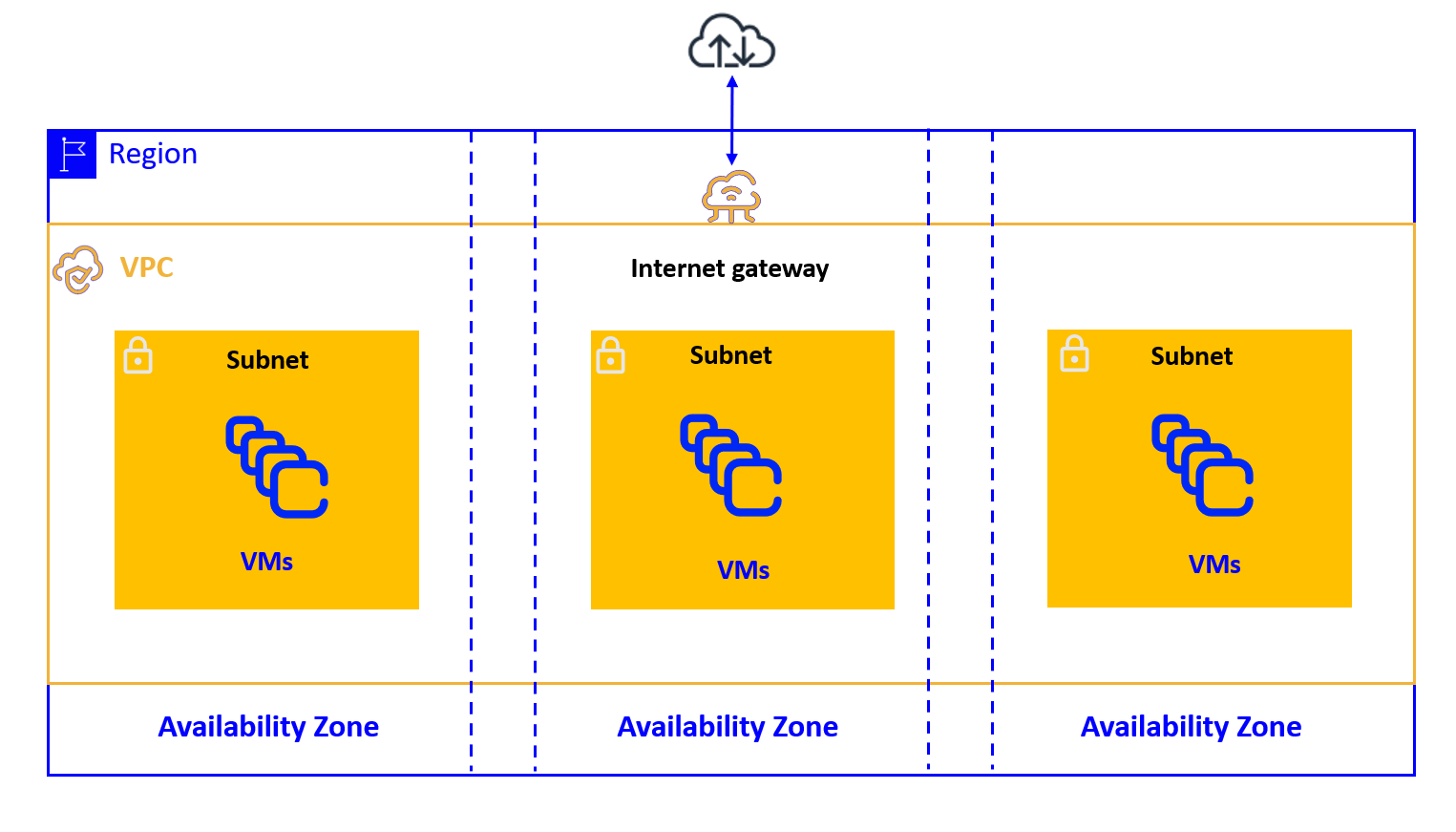
A VPC or a subnet can be in one of the following states:
- "pending": the creation process is in progress;
- "available": the VPC or the subnet is created and you can launch resources in it;
- "deleting": the VPC or the subnet is being deleted.
When you use a VPC, you can specify the allocation option for the whole VPC during its creation.
- If you set the VPC allocation option to "default", you must set the "tenancy" attribute of each VM that you want to place on a dedicated server to "dedicated".
- If you set the VPC allocation option to "dedicated", the "tenancy" attribute of all VM launched in this VPC is automatically set to "dedicated".
You cannot modify the allocation option once your VPC is created.
Routing and security of a subnet
Routing
To control the outbound traffic of each subnet, you must associate a route table with it. A main route table is created automatically for your VPC and each subnet is associated with it by default.
You can also create your own route tables and associate them with your subnets.
The routes contained in the main route table can be modified, and you can also set one of your own route tables as the main route table.
It is recommended to use one route table per subnet for easier and more precise management of network traffic.
Security groups
Security groups are security features that allow you to control access to your VM in your VPC.
They act as a set of firewall rules that control inbound and outbound traffic flows.
When you create VM in a VPC, you must associate them with one or more security groups.
If you do not specify a security group, the VM is automatically associated with the default security group created with your VPC.
You can then modify the rules of the security group that you created or of the default security group according to your architecture and the controls that you want to configure.
It is recommended to use security groups to restrict access to your VM and thus strengthen the security of your VPC.
In a VPC, you can authorize access to and from:
- another security group of the VPC or of a peer VPC;
- a CIDR block.
By default, thanks to a network enhancement, the VM in the same subnet can communicate with each other without any security group rule required. This reduces the latency between two VM and avoids conflicts with specific protocols, such as those used by Microsoft Windows.
If you want increased security between your VM (for example one on a DMZ and the other on an internal network), place them in different subnets or disable this feature.
You can disable this feature by adding, before creating subnets, the osc.fcu.enable_lan_security_groups tag to your VPC.
The value that you specify for this tag is not taken into account. Once this tag is added, you must add the appropriate rules to the security groups of your VM placed in the same subnet to allow them to communicate with each other.
This behavior cannot be modified by adding or removing this tag once subnets are created in your VPC.
It is recommended to use one security group per subnet, just as it is recommended to use one route table per subnet. This amounts to creating a subnet for a specific application, with its own route table and its own security group adapted to its network connectivity and security needs.
IP and Internet access
Each VM created in a VPC has a main private IP address assigned that is not accessible from the Internet.
You can choose the private IP address associated with the VM created in the subnet of a VPC, or it can be automatically chosen from the IP range of the subnet. You can also add secondary private IP addresses to a VM in a VPC by using NIC (Network Interface Cards).
By default, the VM created in a VPC have no public IP assigned and can only communicate with each other. To connect VM in a VPC to the Internet, you must use public IP, which are static public IP addresses that you can associate with a VM, a network interface or a nat gateway.
There are two ways to connect VM of a VPC to the Internet:
-
Direct: to directly connect VM of a VPC to the Internet, you must associate a public IP address with them and use an internet gateway to send the traffic to and from the Internet.
-
Indirect: to indirectly connect VM of a VPC to the Internet, you must use a nat gateway that carries the public IP address and that sends the traffic to and from the Internet on behalf of the VM.
In both cases, you must route the 0.0.0.0/0 traffic of the subnet in which the VM are located to the internet gateway or the nat gateway.
You must also add the appropriate rules to the security groups of your subnets.
Indirect Internet access allows, for example, your VM to search for available updates.
To access NTP (Network Time Protocol) servers, the VM must be connected to the Internet. Therefore, to allow your VM in a VPC to access NTP servers, you must add one of the following routes to the route table associated with their subnet:
- a route that allows them to access the whole Internet, with 0.0.0.0/0 as destination and an internet gateway or a nat gateway as target;
- a route that allows them to access only an NTP server, with the IP of the NTP server as destination and an internet gateway or a nat gateway as target.
VPC and the other services
VPC can be connected to other networks using the following services, which also require a virtual gateway and, for VPN Connections, a client gateway:
- Direct Link: the DirectLink service allows you to establish a dedicated physical connection between your internal network (on-premise) and a DirectLink site hosting your Numspot VPC environment. This connection offers a private, stable and low-latency network link, to directly access your cloud resources without transiting through the public Internet.
This service is not enabled automatically: it requires a specific request to Numspot and the setting up of a physical link (optical fiber or operator interconnection) between your infrastructure and an approved DirectLink access point.
Once the link is established, it is associated with a virtual gateway of your VPC, enabling private routing between your local network and your cloud environment.
- VPC Peering: you can peer two VPC to allow the resources in each of them to communicate with each other.