About virtual gateways
- Create a virtual gateway
- Attach a virtual gateway
- Get information about your virtual gateways
- Detach a virtual gateway
- Delete a virtual gateway
A virtual gateway is located on the Numspot side of a VPN (Virtual Private Network) connection, and is attached to one of your VPC (Virtual Private Cloud).
Its counterpart on your side of the VPN connection is a client gateway.
General information
A virtual gateway is the entry and exit point on the Numspot side of a VPN connection. Traffic between the VM in the VPC and your corporate network is routed through it.
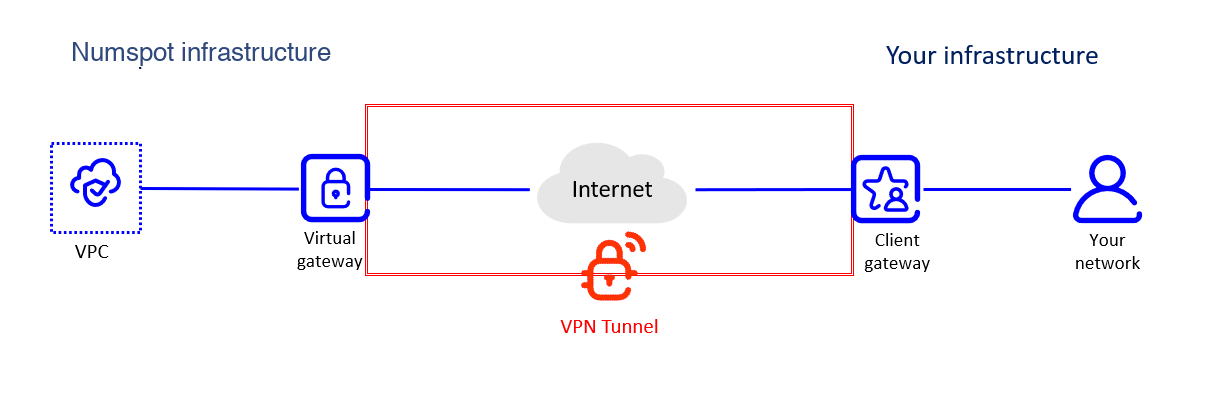 Architecture of a VPN connection
You can attach a single virtual gateway at a time to each VPC. However, you can connect the same virtual gateway to five client gateways simultaneously. This allows you to create VPN connections between the same VPC and up to five corporate networks, for example for different premises or departments.
Lifecycle
A virtual gateway can be in one of the following states:
- Pending: The creation process is in progress.
- Available: The virtual gateway is created. It is or can be attached to a VPC.
- Deleting: The deletion process is in progress.
- Deleted: The virtual gateway is deleted.
Deleted resources remain visible for 1 hour.
In addition, a virtual gateway in the available state can have one of the following attachment states:
- Attaching: The attachment to the VPC is in progress.
- Attached: The virtual gateway is attached to the VPC and can be used to create a VPN connection.
- Detaching: The detachment from the VPC is in progress.
- Detached: The virtual gateway is detached from the VPC.