Concepts
Virtual machines (VM) are virtual computing environments that emulate physical computers. They allow operating systems and applications to run in isolation while sharing the hardware resources (processor, memory, storage) of a host server. Virtualization, which underpins VM, plays a central role in modern computing environments, particularly for server consolidation, cloud computing, software development and testing, and the management of legacy systems.
A VM can be deployed within a VPC (Virtual Private Cloud). It includes compute, storage and memory resources. An operating system (OS) is installed on it, allowing business applications to be hosted. You can choose from different types of hardware configuration (VM types) to suit the specific needs of your workloads. In addition, you can select preconfigured images containing a specific OS and applications as templates to create your VM.
VM are used in a variety of use cases:
- Development and testing: creating isolated environments to test software or applications without affecting the host system;
- Web hosting: setting up scalable and reliable web servers to handle traffic peaks;
- Desktop virtualization: providing virtual desktop environments for remote or mobile users;
- Legacy system management: running legacy applications on modern infrastructure without requiring major changes;
- Disaster recovery: backing up and quickly recovering systems in the event of a failure, thanks to VM portability and replication.
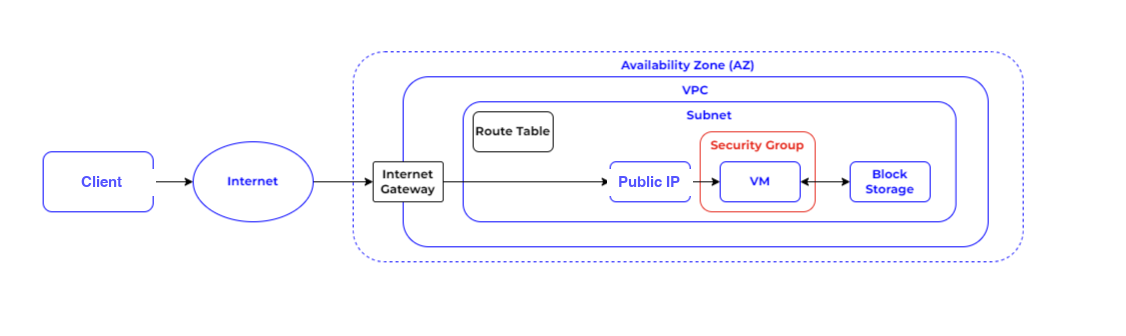
The diagram below represents the basic architecture of a Numspot VM deployed in a VPC. In this example, the VM is hosted in a specific availability zone within a given region. The security of the VM is provided by a security group, which acts as a virtual firewall by controlling inbound and outbound network traffic. For authentication, a key pair is used: a private key, kept on the user's local computer, and a public key, stored on the VM. This combination guarantees the user's identity and enables secure connections. The VM also relies on a block storage volume for data storage. Finally, the VPC is connected to the internet via an internet gateway, allowing the VM to access online resources while remaining isolated in a private environment.
General information about VM
A VM is created in the Cloud using an Image as a template and a VM type as the hardware configuration. An Image serves as a template to create the VM by providing at least an OS, and possibly other software applications.
VM are made up of virtualized vCPU (virtual Central Processing Unit) cores, memory and storage. This storage includes permanent block storage volumes. The VM's system volume is a block storage volume used to store all the OS files as well as other data if needed.
Numspot offers two VM types from which you can choose depending on your compute performance and memory needs:
- Custom VM (coming soon), which let you define the amount of vCPU and memory according to your specific needs;
- Preconfigured VM, designed for dedicated uses such as Big Data or high-performance computing, with a predefined number of vCPU and memory.
VM attributes
VM have attributes that define their characteristics, such as the number of virtual processors, the amount of RAM, the size of the virtual hard disk, and so on.
A VM has the following attributes:
- Block device mappings, which define the attached volumes and whether these volumes are deleted once the VM is terminated;
- A VM type, which determines the compute, memory and storage capabilities;
- The ability to disable deletion to prevent accidental deletion of the VM;
- A key pair for SSH (Secure Shell) encryption, made up of a private key and a public key, with which you can connect to your VM;
- Security groups, which let you control inbound and outbound flows;
- The behavior of the VM on shutdown (stopped, terminated or rebooted) when you initiate its shutdown;
- Whether source/destination checking of network traffic is enabled for the VM;
- User data, which allow further configuration of the VM.
VM and security groups
Security groups are sets of security rules that control inbound and outbound network traffic for one or more VM. Security groups are associated with VM when they are created and can be modified as needed. They control access to VM, for example by allowing only traffic from certain IP (Internet Protocol) addresses or ports. VM can be associated with one or more security groups to control their network access.
By default, a security group does not allow any inbound flow to your VM. You must specify rules for the security groups according to your needs and your architecture. You can add or remove security group rules and modify the security groups associated with an existing VM according to your configuration.
A default security group is available for your account. This security group only allows interactions between VM associated with this same security group. You can, however, modify its rules if needed. In a VPC, security groups filter both inbound and outbound flows.
A security group rule is made up of the following elements:
- Flow: inbound or outbound;
- Protocol: TCP (Transmission Control Protocol), UDP (User Datagram Protocol) or ICMP (Internet Control Message Protocol);
- From port: the source port;
- To port: the destination port;
- Source CIDR (Classless Inter Domain Routing): the network address to filter on, in CIDR notation;
- Source security group: another security group to filter on.
VM allocation and dedicated VM
VM can be allocated dynamically or on a dedicated basis. Dynamically allocated VM are created on a physical host as needed, whereas dedicated VM are created on a specific physical host reserved for that purpose. Dedicated VM offer more predictable performance and greater isolation than dynamically allocated VM. They can be useful for workloads requiring high and consistent performance, such as databases or critical applications.
By default, VM are placed on servers shared between different accounts. However, you can specify that you want to place your VM on dedicated servers when you create them. Dedicated VM do not share hardware with other accounts, but they do share it with non-dedicated VM that belong to the same account. Using dedicated VM lets you benefit from the maximum capacity of the server. So, when you create a VM in a VPC or you create a VPC, the available allocation options are as follows:
default: your VM is placed on a shared server;dedicated: your VM is placed on a dedicated server.
It is also possible to configure a VPC so that all the VM created in it are automatically configured as dedicated. The parameter to modify is called "tenancy"; it can be set to dedicated or default.
Creating dedicated VM may require an increase of quotas other than those allocated to your account by default. To increase the corresponding quota, please contact the Support team at support@numspot.com, reach out to your Technical Account Manager or sales-eu@numspot.com.
Nested virtualization
Nested virtualization allows a VM to be run inside another VM. This feature can be useful for testing VM configurations, creating isolated development environments, and so on. Nested virtualization is supported by certain VM types at Numspot.
- Nested virtualization can be enabled only via the API (Application Programming Interface). It also requires the allocation parameter to be set to dedicated;
- Nested VM share the capacity of the host VM. Make sure that your host VM has enough memory, cores and storage space to create nested VM;
- Nested VM can be based only on external images (.iso files), not on Numspot images.
VM lifecycle
VM have a lifecycle that includes the following stages: creation, start, stop, reboot and deletion. VM can be created from a VM template, a snapshot or a copy of another VM. VM can be stopped and restarted depending on their state and configuration, and can be deleted when they are no longer needed. You can monitor the state of your VM using the Numspot management console.
VM types (templates)
VM types (or VM templates) define the basic characteristics of a VM, such as the number of virtual processors, the amount of RAM, and so on. Numspot offers a variety of VM types to meet the needs of different types of workload. You can choose the VM type that best suits your needs depending on the workload characteristics, such as compute power, memory and storage. VM types can be customized according to specific needs.
Compute billing
VM billing is calculated based on three main criteria: the selected VM type, the deployment region and the duration of use. Billing is performed per second, with a minimum of one hour of billing from the moment the VM is started. This billing granularity allows cost optimization based on the actual use of resources.
VM and volumes
Block storage volumes are block storage devices that can be attached to VM to provide persistent storage. These volumes offer an elastic and high-performance storage solution, allowing critical data such as databases or user files to be stored. Block storage volumes can be managed independently of VM: they can be created, attached, detached and deleted as needed. You can also create snapshots to perform point-in-time backups or copies of data.
VM and IP addresses
Each VM has a private IP address by default. You can associate additional private IP addresses with a VM as well as one or more public IP addresses. Private IP addresses are used for communication between VM within the same VPC, whereas public IP addresses are used for communication with the internet. You can associate public IP with your VM to guarantee a static IP address. You can also configure security groups to control network access to VM based on their IP address.
VM and key pairs
Key pairs are pairs of SSH keys used to authenticate access to VM. You can create SSH key pairs and associate them with your VM when they are created. You can also add or remove SSH keys from your VM as needed. Only public keys are stored at Numspot; the private key is immediately deleted after the key pair is created, once you have downloaded it to your local machine. Backing up and securely keeping private keys and associated passwords is your responsibility.
VM and metadata
Metadata is additional information that can be associated with VM. Metadata can be used to store information such as the VM name, the owning user, tags, and so on. You can create and modify metadata for your VM using the Numspot API. Metadata can be used to facilitate the management and automation of VM.