About GPU
GPU (Graphics Processing Unit) are Cloud resources used for graphics rendering and heavy parallel computing. You can allocate GPU to your account and attach them to or detach them from your VM (Virtual Machine).
General information
A GPU is a resource that can be allocated to your account and attached to or detached from your VM. You can attach several GPU to the same VM if these GPU are of the same model.
A GPU can be in one of the following states:
allocated: The GPU is reserved for your account;attaching: The attachment of the GPU to a VM is scheduled. You must stop the VM to move the GPU to the attached state;attached: The GPU is used by the VM. It is considered as a device connected to the VM;detaching: The detachment of the GPU is scheduled. You must stop the VM to move the GPU to the allocated state.
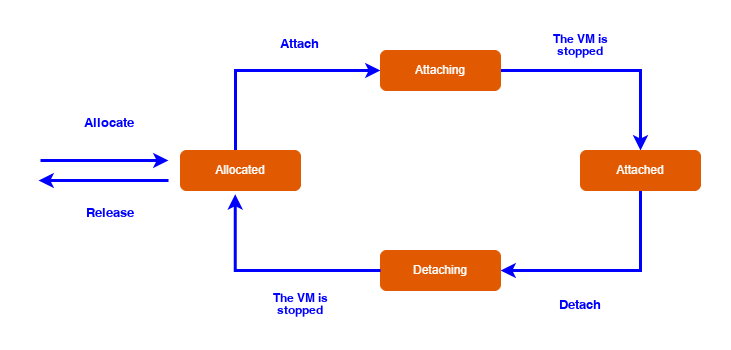
GPU lifecycle
When you attach a GPU, the VM must meet the following conditions (see the GPU models table below):
- Have the
highestperformance flag (1); - Have fewer than a certain number of vCores, that is to say vCPU (virtual Central Processing Unit);
- Have less than a certain amount of memory;
- Have a processor generation compatible with the GPU.
In addition, the VM must not be a dedicated VM.
GPU models
Numspot provides various GPU models, with different amounts of VRAM (Video Random Access Memory) memory:
| GPU model | GPU VRAM (in MiB) | Maximum number of vCores | Maximum amount of memory (in GiB) | Compatible processor generations | Regions |
|---|---|---|---|---|---|
| nvidia-l40 | 48000 | 35 | 250 | v7 | eu-west-2 cloudgouv-eu-west-1 |
| nvidia-h100 | 80000 | 32 | 256 | v7 | eu-west-2 cloudgouv-eu-west-1 |
| nvidia-a100-80 | 80000 | 35 | 256 | v6 | eu-west-2 |
| nvidia-a100-80 | 80000 | 35 | 256 | v6, v7 | cloudgouv-eu-west-1 |
Numspot also offers inference VM with integrated GPU (nvidia-l40, nvidia-h100, nvidia-h200). Unlike fGPUs (flexible GPU), these GPU do not require prior allocation and are directly available on the VM. For more information, see the VM types page.
VM type conversion
As with any VM, you can change the type of a VM that has GPU attached. However, the number of attached GPU may be incompatible with the new VM type (number of vCores, amount of memory, processor generation). Different behaviors occur depending on the VM types.
If all the GPU attached to the VM are compatible with the new VM type, the VM is converted.
Otherwise, a vm-specs-mismatch error is returned.