About DirectLink
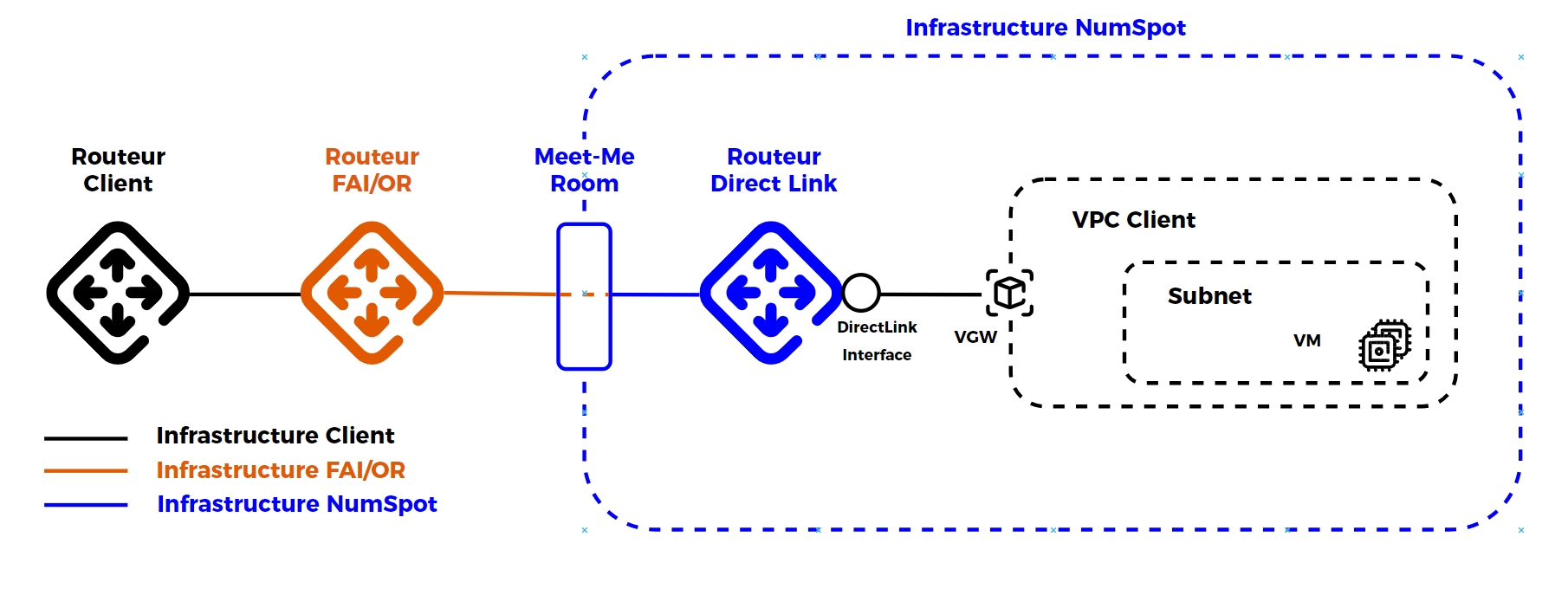
DirectLink lets you establish a private connection between your network and the Numspot infrastructure. This interconnection relies on dedicated 1 Gb/s or 10 Gb/s links, without going through the public Internet. The applicable service levels are defined in the contractual terms.
The sponsor must send an email to support-client@numspot.com to request the setup of a DirectLink.
General information about DirectLink connections
A DirectLink connection is a physical connection between your network and a DirectLink site, which corresponds to a physical location of the Numspot infrastructure.
This connection is a 1 Gb/s Ethernet or 10 Gb/s Ethernet optical fiber that gives you direct access to your Cloud resources located in the region corresponding to this site, without going through the Internet.
DirectLink Interfaces let you configure these connections by specifying the VPC (Virtual Private Cloud) to which you want to connect through your DirectLink connection.
Before requesting a DirectLink connection, make sure that:
- your Internet service provider or network operator has equipment in the same data center as the targeted DirectLink site;
- you have a compatible single-mode fiber;
- you have equipment that supports the BGP protocol.
Presence of the Internet service provider or network operator on the relevant site: eu-west-2:
- PAR1, Téléhouse (Magny-Les-Hameaux)
- PAR4, Equinix (Pantin)
Advantages
Using DirectLink provides several significant advantages compared with a standard Internet connection:
- Dedicated bandwidth, ensuring consistent performance and speed
- Reduced latency thanks to a direct path between the endpoints
- Private and dedicated connection, providing better data protection
- Reduced risk of communications being intercepted by unauthorized parties
- More stable connection, less prone to congestion issues
- Redundancy: the option to increase availability by deploying two secure accesses
- Adaptable bandwidth options, of 1 Gb/s or 10 Gb/s
Setup request
Here is the procedure to request a DirectLink connection:
- Identify the DirectLink site corresponding to the region where your resources are located:
curl 'https://api.{region}.numspot.com/connectivity/spaces/{spaceId}/readLocations'
-- Replace{region}with eu-west-2 or cloudgouv-eu-west-1
-- Replace{spaceId}with your SpaceID, which you can copy as shown below:
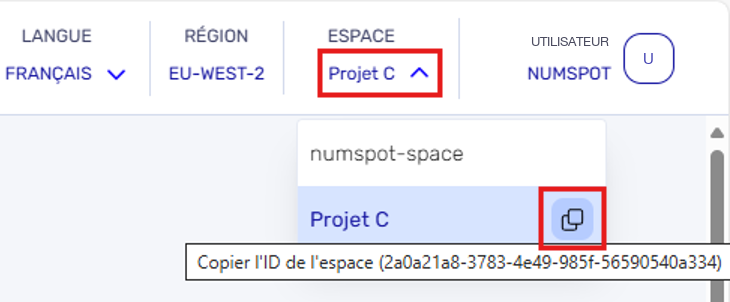
You should see this message appear at the bottom of the page:

- Make sure you have a router or an optical fiber in the same data center as the DirectLink site, or call on a provider to install it.
- If you have not already done so, create a VPC and a virtual gateway in the desired region, then attach the virtual gateway to the VPC.
Once these steps have been completed, contact Numspot support to start the DirectLink setup process.