About Compute Bridges
A bridge allows two VPC (Virtual Private Cloud) to communicate with each other through a private connection. The VM (Virtual Machine) of the VPC connected together through a bridge can access each other.
General information
You can create several connections for each of your VPC. However, you cannot create more than one connection between the same two VPC at the same time.
A bridge is a private connection using private IP. The CIDR blocks of the VPC connected by a bridge must not overlap.
Example of two CIDR blocks that do not overlap: 172.16.0.0/20, 172.16.16.0/20
The connected VPC must belong to the same space; however, their subnets can be located in different AZ.
Each VPC must contain at least one VM before the bridge is created.
- A bridge between two VPC works in both directions. Therefore, a connection from B to A is not required if a connection from A to B has already been created and accepted.
Once the bridge is created, network traffic between the connected VPC is possible. You must update their route table by adding a route, and their security group to authorize the traffic.
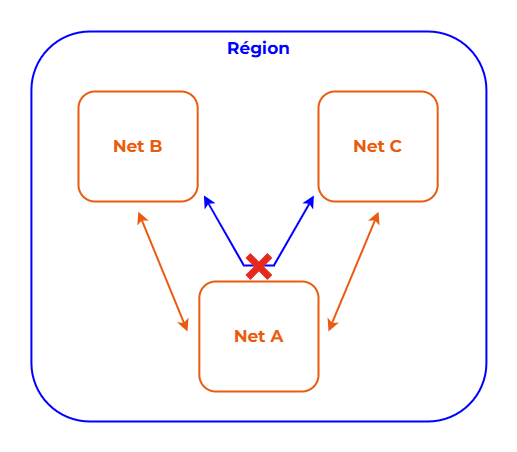
A bridge is a direct, individual and non-transitive connection. Therefore, bridges cannot communicate with other VPC to which they are not directly connected. Two VPC that are each connected to the same third VPC cannot use it as a transit point to access each other.
Non-transitive connection through a Compute Bridge:
To ensure redundancy and high availability, you can connect two VPC whose subnets are located in different AZ.
Lifecycle
Once requested, a bridge can go through several states. At each state, different actions are possible.
Lifecycle of a bridge:

failed: The bridge creation failed. This happens, for example, if the CIDR blocks of the VPC overlap. A connection in thefailedstate cannot be deleted.active: The connection is created between the VPC. The bridge can be deleted at any time.deleted: The connection has been deleted.
Connections whose state is failed or deleted remain visible for 1 hour.
Network configuration
Route table
To authorize traffic between connected VPC, you must update the route tables associated with their subnets.
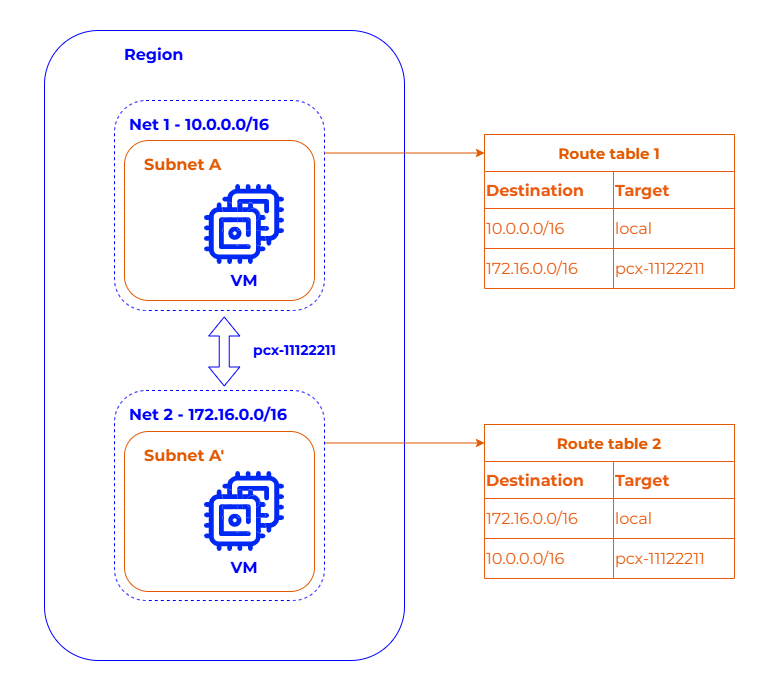
Each of the VPC owners must create a new route with the CIDR block of the other VPC as the destination, and the ID of the bridge as the target. This allows the VM to direct traffic between the two VPC.
We recommend that you wait until the bridge becomes active before creating a route.
Architecture of a Compute Bridge:
Security group
To authorize traffic between the VM of the VPC of a bridge, you must update the security groups associated with their VM.
Each of the VPC owners must add the appropriate rules authorizing outbound and inbound flows from and to the subnet of the other VPC.