Attach or detach a GPU
You can attach a GPU (Graphics Processing Unit) to a VM (Virtual Machine), or detach it at any time. To attach a GPU, you must first allocate it to your account. For more information, see Allocate or release a GPU.
Permissions
These actions require the following IAM (Identity and Access Management) permissions:
- compute.gpu.update
Attach a GPU
- Console
- API
- Terraform
-
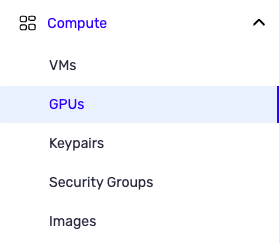
From the left-hand side menu, click Compute → GPU.
-
In the GPU dashboard, choose from the list the GPU you want to attach to a VM.
-
Choose the Attach to a VM action.
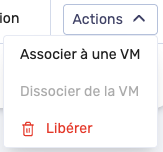
An "Attachment to a VM" panel appears.
-
In the "Choose a VM" list, select the VM to which you want to attach the GPU.
-
Click Attach to the VM.

-
A confirmation message appears at the bottom of the page indicating that the GPU is successfully attached to the VM.
To finalize the attachment of the GPU, you must perform a stop and then a start of the VM.
A simple restart is not sufficient, because the attachment of the GPU takes place when the VM passes through the stopped state.
For the difference between stop/start and restart, see VM lifecycle.
The PUT /compute/spaces/{spaceId}/flexibleGpus/{id}/vms/link command attaches one of your allocated flexible GPU (fGPU) to one of your VM.
The fGPU is in an attaching state until the VM is stopped, after which it becomes attached.
You can only attach fGPUs to VM with the highest performance flag: "highest" (1).
The Terraform documentation is available on the Numspot registry ↗.
Detach a GPU
This action requires the following IAM (Identity and Access Management) permissions:
- compute.gpu.update
- Console
- API
- Terraform
-
From the left-hand side menu, click Compute → GPU.
-
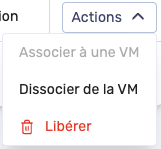
Select the GPU you want to detach and choose the Detach from the VM action. The "Detach from the VM" dialog box appears.
-
Click Detach from the VM.
-
A confirmation message appears at the bottom of the page indicating that the GPU is successfully detached from the VM.
To finalize the detachment of the GPU, you must perform a stop and then a start of the VM.
A simple restart is not sufficient, because the detachment of the GPU takes place when the VM passes through the stopped state.
For the difference between stop/start and restart, see VM lifecycle.
The PUT /compute/spaces/{spaceId}/flexibleGpus/{id}/vms/unlink command detaches a flexible GPU (fGPU) from a VM.
The fGPU is in a detaching state until the VM is stopped, after which it becomes allocated again. It is then available again to be attached to another VM.
The Terraform documentation is available on the Numspot registry ↗.