About VPN connections
- Create a VPN connection
- Get information about your VPN connections
- Update a VPN connection
- Delete a VPN connection
A VPN (Virtual Private Network) connection is a secure connection between your corporate network and one of your VPC (Virtual Private Cloud) in the Numspot Cloud. The resources on each side of the connection can communicate with each other.
General information
A VPN connection is made up of the following elements:
- A client gateway, on your side of the connection. This resource is located in your corporate network, and can be software or hardware.
- A virtual gateway, on the Numspot side of the connection. This resource is attached to one of your VPC.
- A VPN tunnel, which links the client gateway and the virtual gateway securely across the internet.
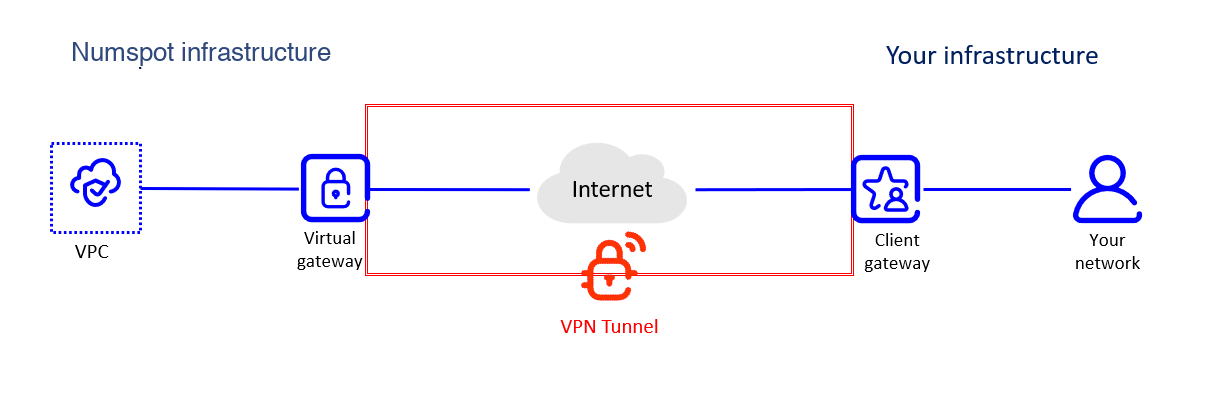 VPN connection architecture
The encryption protocol of the VPN tunnel is IPsec.
Once the VPN connection is created, the VPN tunnel becomes active as soon as traffic is generated from your side of the connection. The tunnel is therefore established from your client gateway, not from the virtual gateway.
To ensure redundancy and high availability, you can create several VPN connections between your network and the same VPC.
You can also link your corporate network to a VPC with DirectLink, a secure physical connection.
A VPN connection does not provide internet access. To link the VPC to the internet, you must add an internet gateway to it. You can also associate the internet gateway with a NAT Gateway.
Lifecycle
A VPN connection can be in one of the following states:
- "Pending": the creation process is in progress. The VPN connection remains in this state until traffic is generated from the client gateway.
- "Available": the VPN connection is created and ready to be used.
- "Deleting": the deletion process is in progress.
- "Deleted": the VPN connection is deleted. To link your corporate network and the VPC again, you must create a new one.
Deleted resources remain visible for 1 hour.
In addition, for a VPN connection in the "Available" state, the VPN tunnel can be in one of the following states:
- "Up": the tunnel is active and receives traffic between the client gateway and the virtual gateway.
- "Down": the tunnel is inactive, and no traffic flows between the client gateway and the virtual gateway. This is due, for example, to a misconfiguration of the VPN connection, or follows a period of inactivity depending on the configuration.
Network configuration
To allow traffic between the two sides of the VPN connection, you must configure the following resources:
- On your side of the connection, the firewall of the client gateway. You must open the appropriate ports to allow traffic from the virtual gateway.
- On the Numspot side of the connection, the security groups associated with the VM (Virtual Machine) in the VPC. You must add the rules that allow inbound and outbound traffic from and to your corporate network.