About the routing configurations of VPN connections
A VPN (Virtual Private Network) connection uses two types of routes that you must configure between your corporate network and one of your VPC (Virtual Private Cloud) in the Numspot Cloud.
Route types
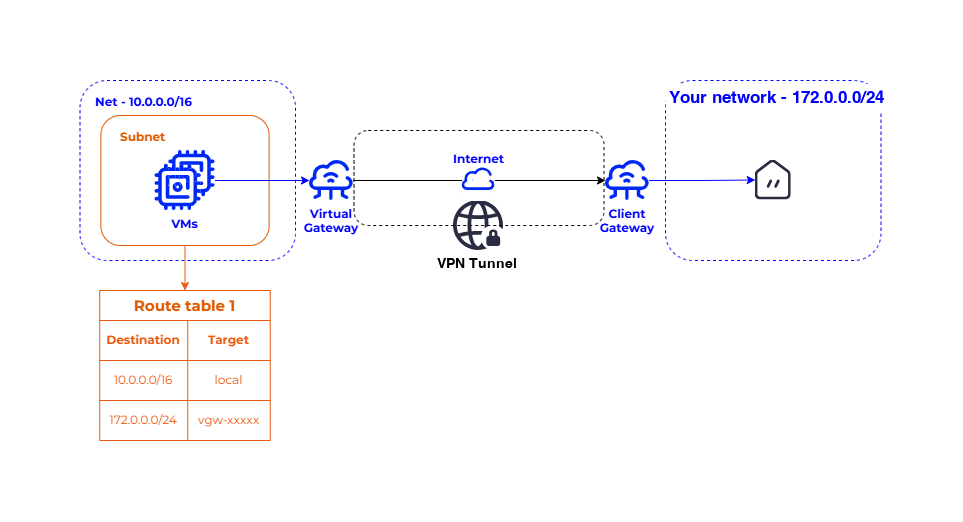
A VPN connection uses two types of routes:
- VPC routes: for traffic inside the VPC, between the VM (Virtual Machine) and the virtual gateway.
- VPN routes: for traffic inside the VPN tunnel, between the virtual gateway and the client gateway.
Both types of routes use the CIDR (Classless Inter-Domain Routing) of your corporate network as the destination, and the ID of the virtual gateway as the target.
Routes of a VPN connection:
Static and dynamic routing
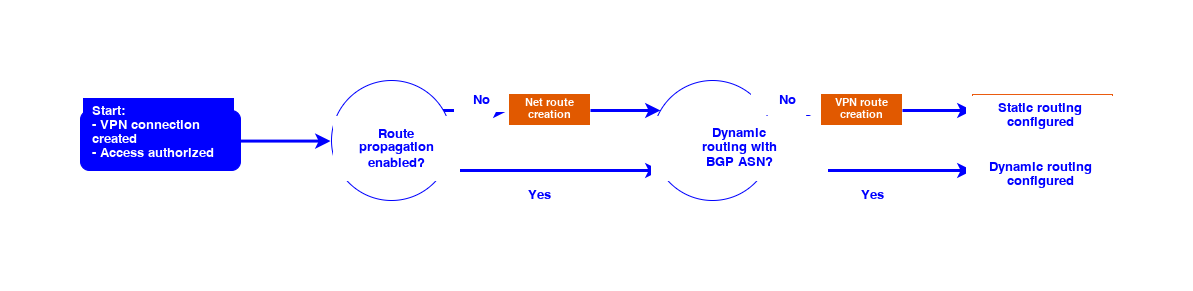
To allow the VM in your VPC to reach the client gateway, you must specify the routing type for the VPN connection, and update the route table in the subnet of the VPC:
- For static routing, you must create new VPN routes.
- For dynamic routing, you must not create new routes. However, you must use resources compatible with BGP (Border Gateway Protocol).
You cannot change the routing type once the VPN connection is created. You can use a default or custom route table.
Configuration
Routing flow chart of a VPN connection:
Route propagation
You can enable route propagation to a route table associated with a subnet of the VPC. This action automatically adds to the route table the VPC routes pointing to the virtual gateway. Route propagation is optional, and applies to static or dynamic routing. You can use a default or custom route table.
Without route propagation, you must manually add each route to the route table.
BGP ASN
BGP is a dynamic routing protocol based on ASN (Autonomous System Numbers). In a VPN connection with BGP, the client gateway displays an ASN to help the virtual gateway find a path to it across the internet network.
To use BGP, your resources must be compatible with dynamic routing. Using BGP is optional: you can choose static routing even if your resources are compatible with dynamic routing.
If you connect several client gateways from the same network to the same virtual gateway, these client gateways must all use the same ASN for BGP.
Otherwise, you must manually create new VPN routes.