About Load Balancers
A load balancer distributes incoming network traffic across several VM (Virtual Machine) to spread the load and increase the availability and reliability of your services.
You can:
- distribute the network load using the TCP (Transmission Control Protocol)/SSL (Secure Sockets Layer) and HTTP (HyperText Transfer Protocol)/HTTPS (HyperText Transfer Protocol Secure) protocols;
- distribute the traffic across several Availability Zones (AZ) or subnets;
- configure health checks to verify the state of each VM and redirect traffic only to healthy instances.
General information
Load balancers and backend VM
The VM registered with a load balancer are called backend VM. You can register as many backend VM as needed, and (de)register them at any time according to your requirements.
- You can register a backend VM with an Internet-facing load balancer using its public IP address. See: Attach a public IP to a VM or to a network interface and Register VM with a load balancer.
- A load balancer is created in a specific Availability Zone or subnet, but it can distribute traffic to all the Availability Zones of its region or all the subnets of its network.
Depending on their security groups, backend VM can receive:
- only the traffic coming from the load balancer;
- or the traffic coming from other sources (for example another load balancer or the Internet).
Load balancers operate in round robin: incoming requests are distributed evenly across all the backend VM. The load balancer also performs health checks to determine which VM are available for the traffic. For more information, see Configure health checks.
Only one type of health check can be configured per load balancer. It is recommended to create one load balancer per service in order to avoid false positives or the failure to detect an outage.
Load balancer types
A load balancer can be:
- Public (Internet-facing)
- Internal (private)
Public load balancer:
Created in a VPC (Virtual Private Cloud), it distributes the incoming flows coming from the Internet across the backend VM located in different Availability Zones of the same region or in several subnets of the same VPC. This type of load balancer is accessible from the Internet.
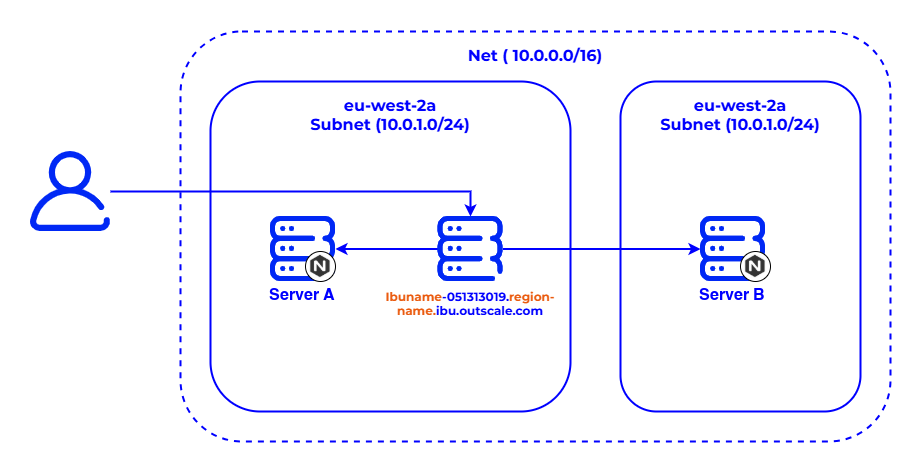
Internal load balancer:
Created in a private network (VPC or Net), it distributes the traffic across the backend VM in one or more subnets. This type of load balancer is accessible only from the internal CIDR (Classless Inter-Domain Routing) block of the network.

DNS name
Each load balancer automatically receives a DNS (Domain Name System) name, made up of its name and its endpoint (load-balancer-name.endpoint). This DNS name is used to access it and send traffic to it.
- Public load balancers receive a public DNS name.
- Internal load balancers receive a private DNS name.
The DNS name of an internal load balancer is resolved to its private IP address, whether internally (within the network) or publicly (in a connected environment).
Public IP address
Public IP addresses are public IPv4 addresses that you can allocate to your Numspot account. They can be associated with public load balancers to allow them to receive Internet traffic.
The associated public IP addresses can:
- either belong to Numspot (when they are created automatically by the platform);
- or be provisioned in your own account space (when you allocate them explicitly).
The table below describes the association behavior depending on the parameters used:
| Numspot API method | Public IP address specification | Association behavior |
|---|---|---|
CreateLoadBalancer | Specified | The specified public IP address is associated with the load balancer. |
CreateLoadBalancer | Not specified | A public IP address managed by Numspot is automatically created and associated with the load balancer. |
UpdateLoadBalancer | Specified | If the previous IP address belonged to you, it is disassociated. If it belonged to Numspot, it is released. |
UpdateLoadBalancer | Specified with an empty value | If the previous IP address belonged to you, it is replaced by an IP address managed by Numspot. If it already belonged to Numspot, it remains unchanged. |
UpdateLoadBalancer | Not specified | No IP address change. |
DeleteLoadBalancer | — | If the public IP address belongs to you, it is disassociated. If it is managed by Numspot, it is automatically deleted. |
For more information, see About public IP.
Configuration
Listeners
Each load balancer must be created with at least one listener, that is, a process responsible for listening to incoming traffic on a specific port and protocol.
A listener defines:
- the frontend protocol and port (client side);
- and the backend protocol and port (VM side).
The supported protocols are:
- HTTP / HTTPS
- TCP / SSL
- The supported secure protocols are TLS (Transport Layer Security) 1.1 and TLS 1.2. TLS 1.0 and the deprecated versions of SSL are not supported.
- A listener cannot be modified after creation, but you can add or remove several of them per load balancer.
The ports must be between 1 and 65535 inclusive. The frontend and backend protocols must be of the same type:
- HTTP(S) → HTTP
- TCP/SSL → TCP
You can also configure listener rules to redirect traffic according to the URI path or other criteria. See Create a listener rule.
Sticky sessions
By default, each network request is distributed independently. To keep the session of a given user on the same backend VM, you can enable sticky sessions using a persistence cookie.
Two modes exist:
- Duration-based: the cookie has a fixed duration.
- Application-controlled: the session lasts as long as the cookie defined by the backend VM is valid.
Sticky sessions are available only for load balancers with HTTP or HTTPS listeners.
In the event of a backend VM failure, the session is automatically redirected to a healthy VM and remains active until the cookie expires.
You can enable secure cookies, usable only over HTTPS, to strengthen session security.
SSL redirections
You can enable encryption of the traffic between clients and the load balancer by configuring an HTTPS or SSL listener using an x509 server certificate. This certificate, issued by a certification authority, contains the public key and the signature used for server authentication.
- In the case of an SSL termination, the load balancer decrypts the requests before forwarding them to the backend VM (internal cleartext traffic).
- In the case of an SSL passthrough, encryption is maintained end-to-end: the certificate is installed directly on the backend VM.
The SSL certificate can be replaced at any time via the Numspot API or the Console. For more information, see Replace the SSL certificate used by an HTTPS load balancer.
To use SSL termination:
- Upload your server certificate to EIM (Elastic Identity Management).
- Reference it via its NRN (Numspot Resource Name) when creating the listener.
It is recommended to use one certificate per load balancer for simplified management and independent renewal.