Delete a cluster Kubernetes
Delete a cluster Kubernetes within your space, regardless of its status.
Prerequisites: Make sure that the cluster is not in use before deleting it.
This action is irreversible. Once the cluster is deleted, all its associated resources and configurations will be permanently lost.
Permissions
This action requires the following IAM (Identity and Access Management) permissions:
- kubernetes.cluster.delete
- Console
- API
-
From the left-hand side menu, click Managed Services → Kubernetes to access the list of clusters Kubernetes.

-
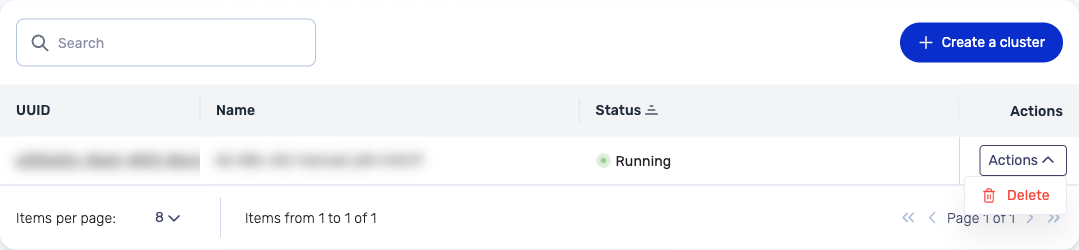
In the list, locate the cluster to delete, click the Actions button on its row, then click Delete.
-
In the Deleting a cluster window, enter the exact name of the cluster in the confirmation field, then click Delete the cluster.
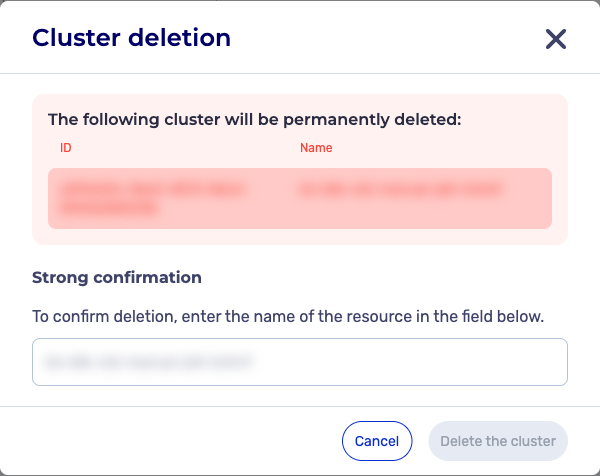
The cluster moves to the "Deletion in progress" status in the list.
The DELETE /kubernetes/spaces/{spaceId}/clusters/{clusterId} request lets you delete a cluster Kubernetes.
The cluster moves to the "deleting" status during the deletion.
Example response
HTTP/1.1 204 No Content