Synchronize secrets with a HashiCorp Vault
Reviewed on · View on GitHub
A Secret Manager instance is an OpenBao instance, API-compatible with HashiCorp Vault KV version 2. Your existing HashiCorp Vault tooling (official vault CLI, SDKs, the External Secrets Operator) connects to the instance natively — no gateway and no protocol adaptation.
This guide shows how to synchronize secrets in both directions:
- Import: propagate secrets from your HashiCorp Vault into your Secret Manager instance (onboarding, migration).
- Export: propagate secrets from your Secret Manager instance back into your HashiCorp Vault (reversibility).
- Continuous synchronization: keep both stores aligned automatically with the External Secrets Operator, including rotations.
There is no built-in replication product between a HashiCorp Vault and Secret Manager: synchronization is performed by standard client-side tooling. Every command in this guide has been validated end to end against a Secret Manager instance running OpenBao 2.5.4, with the official HashiCorp Vault 1.20 CLI and External Secrets Operator 2.14 authenticating with JWT/OIDC — no static token.
Prerequisites
- A Secret Manager instance in the
RUNNINGstate — see Create an instance; - The instance admin token — see Get the admin token;
- The official HashiCorp Vault CLI installed locally (any version compatible with the KV version 2 API);
- A HashiCorp Vault holding your existing secrets, reachable from your workstation;
- An identity provider able to issue short-lived JWTs, with its signing public key — used by the External Secrets Operator section.
The console path for the first two prerequisites:
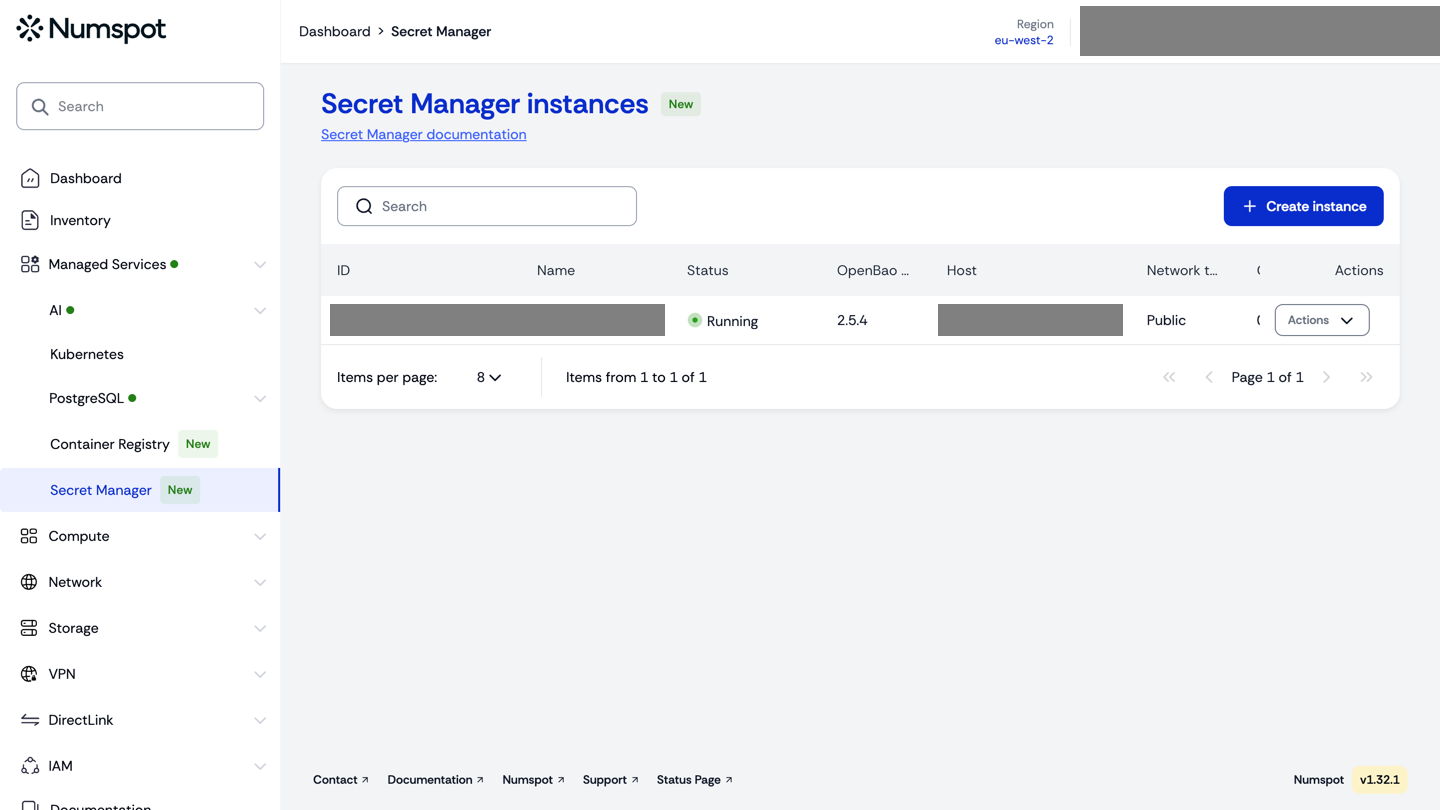
Define the environment variables used throughout this guide:
export BAO_ADDR="https://{instance-host}"   # Numspot Secret Manager instance
export BAO_TOKEN="{admin-token}"            # instance admin token
export VAULT_ADDR="http://{your-vault-host}:8200"  # your HashiCorp Vault
export VAULT_TOKEN="{vault-token}"
Connect the official Vault CLI
The admin token returned by the Numspot API authenticates every call to the instance. The official Vault CLI reads only the VAULT_ADDR and VAULT_TOKEN variables — it ignores the OpenBao-style BAO_ADDR/BAO_TOKEN, which hold the instance credentials. The commands that target the instance therefore carry an explicit prefix, and a bare command always runs against your own Vault:
VAULT_ADDR="$BAO_ADDR" VAULT_TOKEN="$BAO_TOKEN" vault status
Expected output (the instance uses Transit auto-unseal and Raft storage):
Key                      Value
---                      -----
Seal Type                transit
Initialized              true
Sealed                   false
Version                  2.5.4
Storage Type             raft
HA Mode                  active
The same prefix convention applies to every instance-side command below (vault kv put, vault kv get, vault kv list, vault kv metadata get): VAULT_ADDR="$BAO_ADDR" VAULT_TOKEN="$BAO_TOKEN" targets the Secret Manager instance, while a bare command reads $VAULT_ADDR/$VAULT_TOKEN and targets your own Vault.
Verify the KV version 2 engine
The instance exposes a KV version 2 engine on the kv/ mount. List the mounts and confirm the version:
VAULT_ADDR="$BAO_ADDR" VAULT_TOKEN="$BAO_TOKEN" \
  vault secrets list -format=json | jq 'with_entries(select(.value.type == "kv"))'
{
  "kv/": {
    "type": "kv",
    "options": { "version": "2" }
  }
}
A first write-read cycle on the instance confirms end to end access:
VAULT_ADDR="$BAO_ADDR" VAULT_TOKEN="$BAO_TOKEN" \
  vault kv put kv/onboarding/check value=demo-value
VAULT_ADDR="$BAO_ADDR" VAULT_TOKEN="$BAO_TOKEN" \
  vault kv get kv/onboarding/check
Import secrets from your Vault
Secrets are transported one by one: read from the source Vault, write to the Secret Manager instance. For a single secret:
# Read the secret from your HashiCorp Vault ($VAULT_ADDR / $VAULT_TOKEN)
vault kv get -format=json secret/my-app/api-key | jq '.data.data' > api-key.json

# Write the data map into the Secret Manager ($BAO_ADDR / $BAO_TOKEN)
VAULT_ADDR="$BAO_ADDR" VAULT_TOKEN="$BAO_TOKEN" \
  vault kv put kv/my-app/api-key @api-key.json
For several paths, repeat the pair of commands per secret. The jq '.data.data' step extracts the secret data map: vault kv get -format=json outputs the full API response (request_id, lease_id, data, …) and vault kv put … @file.json stores the file verbatim as the secret data map — without the extraction, the response envelope would be stored instead of the value. The file form (@file.json) guarantees that multi-line values (certificates, private keys) are transferred verbatim.
Verify that the transferred value is strictly identical on both sides by comparing a SHA-256 digest:
# Compare the digests (both must be identical)
VAULT_ADDR="$BAO_ADDR" VAULT_TOKEN="$BAO_TOKEN" \
  vault kv get -field=key kv/my-app/api-key | sha256sum
vault kv get -field=key secret/my-app/api-key | sha256sum
# Both commands print the same digest
Export secrets back to your Vault
The same transport works in the other direction — this is the reversibility path. Read from the Secret Manager instance, write into your HashiCorp Vault:
# Read from the Secret Manager instance ($BAO_ADDR / $BAO_TOKEN)
VAULT_ADDR="$BAO_ADDR" VAULT_TOKEN="$BAO_TOKEN" \
  vault kv get -format=json kv/my-app/client-cert | jq '.data.data' > client-cert.json

# Write into your HashiCorp Vault ($VAULT_ADDR / $VAULT_TOKEN)
vault kv put secret/my-app/client-cert @client-cert.json
The synchronization transports secret values. The KV version 2 version history is not replicated: a secret rotated to version 2 on the source is written as version 1 on the target, with the latest value. Plan your rotation workflows accordingly.
Continuous synchronization with the External Secrets Operator
For an automatic, recurring synchronization, use the External Secrets Operator (ESO) with its Vault provider. The example below deploys ESO in a Kubernetes cluster and chains the two directions:
- an
ExternalSecretreading from your HashiCorp Vault, followed by aPushSecretwriting into the Secret Manager instance; - the symmetric chain for the reverse direction.
Install ESO with the official chart:
helm repo add external-secrets https://charts.external-secrets.io
helm install eso external-secrets/external-secrets \
  --namespace eso --create-namespace \
  --set installCRDs=true
The synchronization uses the JWT/OIDC authentication method of the Vault API on both sides: ESO presents a short-lived JWT issued by your identity provider, and each store maps it to a least-privilege role. No static token is stored in the cluster — only the JWT itself, which expires and is renewed like any OIDC workload identity.
On the Secret Manager instance, enable the method on a dedicated mount, register the signing public key of your identity provider and create the synchronization role. The push policy covers both the secret data and the KV metadata of the target path (ESO reads the remote key and updates its metadata on every push), plus read access to the paths exported back to your Vault:
# Secret Manager instance ($BAO_ADDR / $BAO_TOKEN)
VAULT_ADDR="$BAO_ADDR" VAULT_TOKEN="$BAO_TOKEN" vault auth enable -path=client-idp jwt
VAULT_ADDR="$BAO_ADDR" VAULT_TOKEN="$BAO_TOKEN" \
  vault write auth/client-idp/config jwt_validation_pubkeys=@idp-public.pem

VAULT_ADDR="$BAO_ADDR" VAULT_TOKEN="$BAO_TOKEN" vault policy write eso-push - <<'EOF'
path "kv/data/via-eso/*" {
  capabilities = ["create", "update", "read"]
}
path "kv/metadata/via-eso/*" {
  capabilities = ["create", "update", "read"]
}
path "kv/data/my-app/*" {
  capabilities = ["read"]
}
EOF

VAULT_ADDR="$BAO_ADDR" VAULT_TOKEN="$BAO_TOKEN" vault write auth/client-idp/role/eso \
  role_type=jwt bound_issuer="https://idp.example.com" \
  bound_audiences="numspot-sync" user_claim=sub \
  token_policies="eso-push" token_ttl=15m
On your own Vault, the same method with a symmetric role: read access to the source paths, write access to the synchronization path:
# Your HashiCorp Vault ($VAULT_ADDR / $VAULT_TOKEN)
vault auth enable jwt
vault write auth/jwt/config jwt_validation_pubkeys=@idp-public.pem

vault policy write eso-sync - <<'EOF'
path "secret/data/my-app/*" {
  capabilities = ["read"]
}
path "secret/data/via-eso/*" {
  capabilities = ["create", "update", "read"]
}
path "secret/metadata/via-eso/*" {
  capabilities = ["create", "update", "read"]
}
EOF

vault write auth/jwt/role/eso role_type=jwt \
  bound_issuer="https://idp.example.com" \
  bound_audiences="numspot-sync" user_claim=sub \
  token_policies="eso-sync" token_ttl=15m
With a production identity provider, prefer oidc_discovery_url over a static public key: the JWKS endpoint lets both stores pick up key rotations automatically. The bound_issuer, bound_audiences and user_claim values must match the claims of the JWTs your provider issues to the synchronization workload.
Store the JWT issued by your identity provider in a Kubernetes secret, then declare one SecretStore per Vault — the auth.jwt.path field must match the mount path of the authentication method on each store:
kubectl create secret generic idp-jwt -n eso --from-literal=token="$IDP_JWT"
apiVersion: external-secrets.io/v1
kind: SecretStore
metadata:
  name: numspot-store
  namespace: eso
spec:
  provider:
    vault:
      server: https://{instance-host}
      path: kv
      version: v2
      auth:
        jwt:
          path: client-idp
          role: eso
          secretRef:
            name: idp-jwt
            key: token
---
apiVersion: external-secrets.io/v1
kind: SecretStore
metadata:
  name: client-store
  namespace: eso
spec:
  provider:
    vault:
      server: http://{your-vault-host}:8200
      path: secret
      version: v2
      auth:
        jwt:
          path: jwt
          role: eso
          secretRef:
            name: idp-jwt
            key: token
Chain the two directions: import from your Vault, push to the Secret Manager; pull from the Secret Manager, push back to your Vault.
# Direction 1: client Vault -> Secret Manager
apiVersion: external-secrets.io/v1
kind: ExternalSecret
metadata:
  name: from-client-api-key
  namespace: eso
spec:
  refreshInterval: 5s
  secretStoreRef:
    name: client-store
    kind: SecretStore
  target:
    name: demo-api-key
  data:
    - secretKey: key
      remoteRef:
        key: my-app/api-key
        property: key
---
apiVersion: external-secrets.io/v1alpha1
kind: PushSecret
metadata:
  name: push-api-key-to-numspot
  namespace: eso
spec:
  refreshInterval: 5s
  secretStoreRefs:
    - name: numspot-store
      kind: SecretStore
  selector:
    secret:
      name: demo-api-key
  dataTo:
    - storeRef:
        name: numspot-store
      remoteKey: via-eso/api-key
      match:
        regexp: "^key$"
---
# Direction 2: Secret Manager -> client Vault
apiVersion: external-secrets.io/v1
kind: ExternalSecret
metadata:
  name: from-numspot-client-cert
  namespace: eso
spec:
  refreshInterval: 5s
  secretStoreRef:
    name: numspot-store
    kind: SecretStore
  target:
    name: demo-client-cert
  data:
    - secretKey: cert
      remoteRef:
        key: my-app/client-cert
        property: cert
---
apiVersion: external-secrets.io/v1alpha1
kind: PushSecret
metadata:
  name: push-cert-to-client
  namespace: eso
spec:
  refreshInterval: 5s
  secretStoreRefs:
    - name: client-store
      kind: SecretStore
  selector:
    secret:
      name: demo-client-cert
  dataTo:
    - storeRef:
        name: client-store
      remoteKey: via-eso/client-cert
      match:
        regexp: "^cert$"
Check the synchronization status, then read the synchronized values back from both stores:
kubectl get externalsecrets,pushsecrets -n eso
# NAME                             STORE          STATUS         READY
# from-client-api-key              client-store   SecretSynced   True
# push-api-key-to-numspot          numspot-store  Synced         True
# ...

VAULT_ADDR="$BAO_ADDR" VAULT_TOKEN="$BAO_TOKEN" \
  vault kv get kv/via-eso/api-key          # on the Secret Manager instance
vault kv get secret/via-eso/client-cert   # on your Vault
With a refreshInterval of 5 seconds, a rotation performed on the source Vault propagates to the target store automatically within seconds — validated at about 20 seconds for the full chain (pull then push), with no manual step.
Token expiry and revocation
The JWT TTL is the revocation control of the synchronization: issue short-lived tokens, and an operator who revokes the synchronization workload simply stops renewing them. When the JWT expires, the operator surfaces an explicit authentication error — the Vault/OpenBao jwt method rejects the expired token with token is expired, and the status of both resources reports it:
kubectl get externalsecrets,pushsecrets -n eso
# NAME                    STORE          READY   STATUS
# from-client-api-key     client-store   False   SecretSyncedError
# push-api-key-to-numspot numspot-store  False   Errored
The secrets already synchronized in Kubernetes are retained unchanged: the operator never deletes or empties a target secret because an authentication failed. The stores keep serving the last synchronized values to your workloads while the error is visible in the resource status.
Renewing the access is a one-command operation — replace the JWT in the Kubernetes secret with a freshly issued one; the operator picks it up on the next refresh interval and the synchronization resumes, with no change to the synchronized secrets:
kubectl create secret generic idp-jwt -n eso --from-literal=token="$NEW_IDP_JWT" \
  --dry-run=client -o yaml | kubectl apply -f -
The Vault/OpenBao jwt authentication method validates the token signature, issuer, audience and expiration — it does not keep an online revocation list. Short TTLs (minutes, not days) bound the exposure of a revoked or leaked token, and oidc_discovery_url lets the stores pick up signing key rotations automatically.
Points of attention
- No version-history replication: the synchronization is value-level (see the note above). The complete history replication of a Vault store requires Vault Enterprise capabilities, which are out of scope for a standard Vault deployment.
- Different mount paths: a development Vault mounts KV on
secret/while the Secret Manager instance useskv/. Adjust the paths in each command and in theremoteReffields — the engine version (v2) is identical on both sides. - Admin token retrieval: the token can be retrieved once from the Numspot API — store it in a secure location, it is not displayed again. The admin token is meant for administrative operations (initial imports, configuration): for recurring workloads such as the synchronization above, use the JWT/OIDC authentication method — see Configure SSO and Authentication methods.
- Transport security: the instance endpoint serves a publicly signed TLS certificate; the official Vault CLI connects without custom certificate options.
- Full-store migration: to move the entire content of an instance (all secrets, versions and configuration), use Raft snapshots instead of per-secret synchronization — see Backups and restores.
Going further
- Secret Manager concepts: service architecture and lifecycle.
- Configure SSO: OIDC, JWT and LDAP authentication for production workloads.
- Backups and restores: Raft snapshot-based full migration.
- Reversibility: the general reversibility policy for the service.